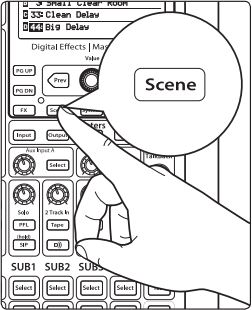
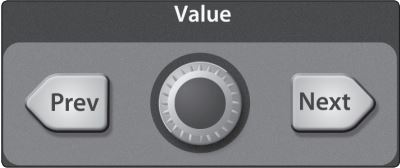
Use the Value encoder to scroll through the Scene library.
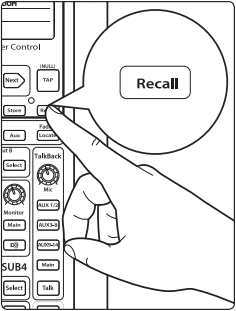
2. When you have found the scene you wish to recall, press the Recall button. By default, the StudioLive will recall all stored parameters (Fat Channel settings, channel muting and soloing, aux mixes, and internal effects parameters) except fader, knob, and graphic EQ positions.
3. If you do not wish to recall a certain set of parameters, simply use the Next and Prev buttons to navigate through the screen.
When the parameter that you wish to disable is selected, turn the Value encoder counter-clockwise to move it to the No (Off) position. Once you have disabled the parameters you do not wish to recall, press the Recall button.
The StudioLive’s recallable parameters are grouped as follows:
Name (SL AI Mixer only): All Channel and Bus names as displayed in the Channel Info page, VSL-AI, SL Remote-AI, and QMix-AI.
Mute: All mute states. This includes input channels, subgroups, and FX buses.
FX: All parameters for the internal effects assigned to FXA, B (C and D FX found on SL 32.4.2 AI mixer only).
Assigns: All output and bus routing. This includes:
Channel and bus routing to mains and subgroups
Stereo linking for all channels and buses
Digital returns to inputs
Channel and bus solo states
Monitor-bus assignments
2 Track In assignments
Talkback assignments and talkback on/of
(StudioLIve Ai mixers) Side-Chaining Effects on all inputs
EQ and Dyn: All Fat Channel dynamics processing, filter parameters, and pan positions for every channel and bus.
Aux Mix: All aux mixes parameters including:
Channel sends to aux mixes
Channel sends to FX processors
Pre1/Pre2/Post position for each aux and FX bus
Faders: All fader positions.
GEQ: Settings for all Graphic equalizers.
NOTE: GEQ settings for all 24.4.2 and 32.4.2 mixers Will recall busses they are assigned to as well.
Pots: All digital knob positions:
Aux output levels
All FX Output Levels
Cue (Solo) level
2 Track In
Phones level
Monitor level
Talkback level
Aux Input A and Aux Input B level
Power User Tip: If you enable knob positions (recalling group “pots”) as a part of your scene recall, all of the digital knobs (Aux outputs, FX levels, Cue, 2 Track In, Phones, Monitor, Talkback, Aux Input A and Aux Input B knobs) will remain at their stored position until they are moved manually. Once a knob is turned, its value will jump to the value of its current physical position. Therefore, if you intend to save a scene and recall the “pots” group later, it is highly recommended that you use the recall sheet provided in the StudioLive Reference manuals to note the stored position of these controls. You can find these manuals with this link here